


Most of the questions people ask about a building get asked from somewhere else: a workplace team planning a move from another city, a facilities manager checking whether the contractor finished the wall, an engineer who needs to know where the electrical panel is before anyone gets on a plane. BIMIT Tour is our answer to that, a walkable 360 virtual tour of the space inside IPX, where you can find the right room, look at what was actually there on the day it was captured, and share that exact spot with a colleague.

The tour lives on the location, level by level, next to the scans, BIM models, CAD and PDFs your team already keeps there. And that matters more than it sounds, because the person asking the question shouldn’t need to know which drive folder the video ended up in.
Three ways to get one
We kept it to the same three ways in as the rest of BIMIT:
We scan it for you. Our scan technicians capture the space with a 360 camera as part of a SCANIT visit, and the tour shows up on the location with the rest of the deliverables.
You film it yourself. Walk the space with any 360 camera that exports equirectangular video, from an Insta360 to a Ricoh Theta, and upload the file (mp4, mov or insv, up to 30 minutes and 25 GB).
You bring a laser scan. When the point cloud carries 360 panoramas we can build the tour from those as well, and we’re checking this one scan at a time right now, which means we’ll tell you before you order whether yours will work.
BIMIT Tour comes as an add-on you turn on for BIMIT 100, 200 or 300 when the capture supports it, rather than a fourth product to choose between, because a model is a file you download and a tour is a place you walk through, and most teams want both from the same visit.
What you do inside it
You move with the arrows or WASD, or click anywhere to jump across the captured space, and the minimap in the corner shows the path that was walked, drawn from the capture itself. Anyone who can edit the location can also set where the tour starts, which sounds small until the first person opens it facing a wall.
When something needs a second pair of eyes, you pin a comment to that spot, with a snapshot of what you were looking at, and tag the person who should see it. They land on the same spot, looking at the same thing, instead of reading “the stain is near the back door” and guessing.
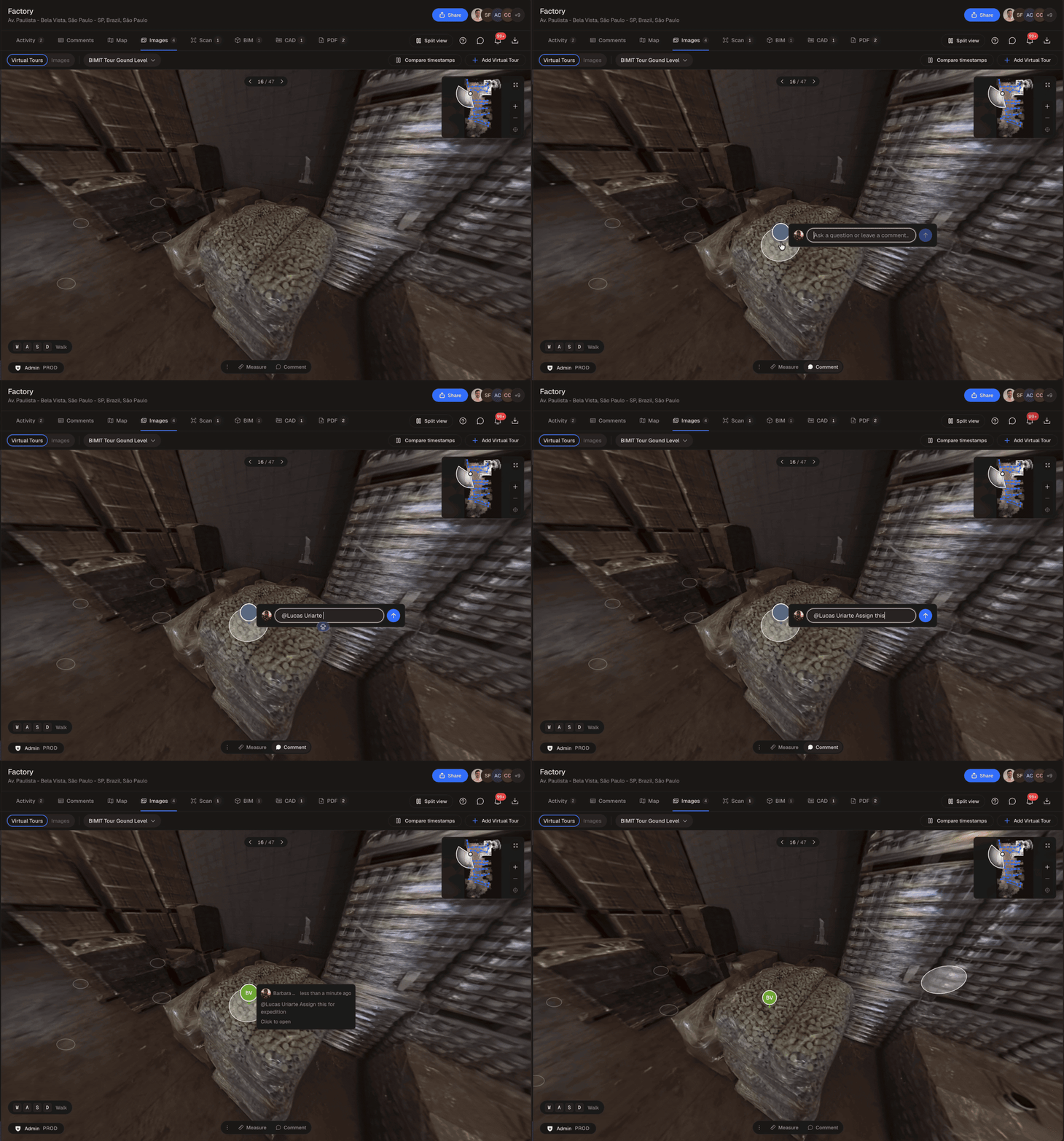
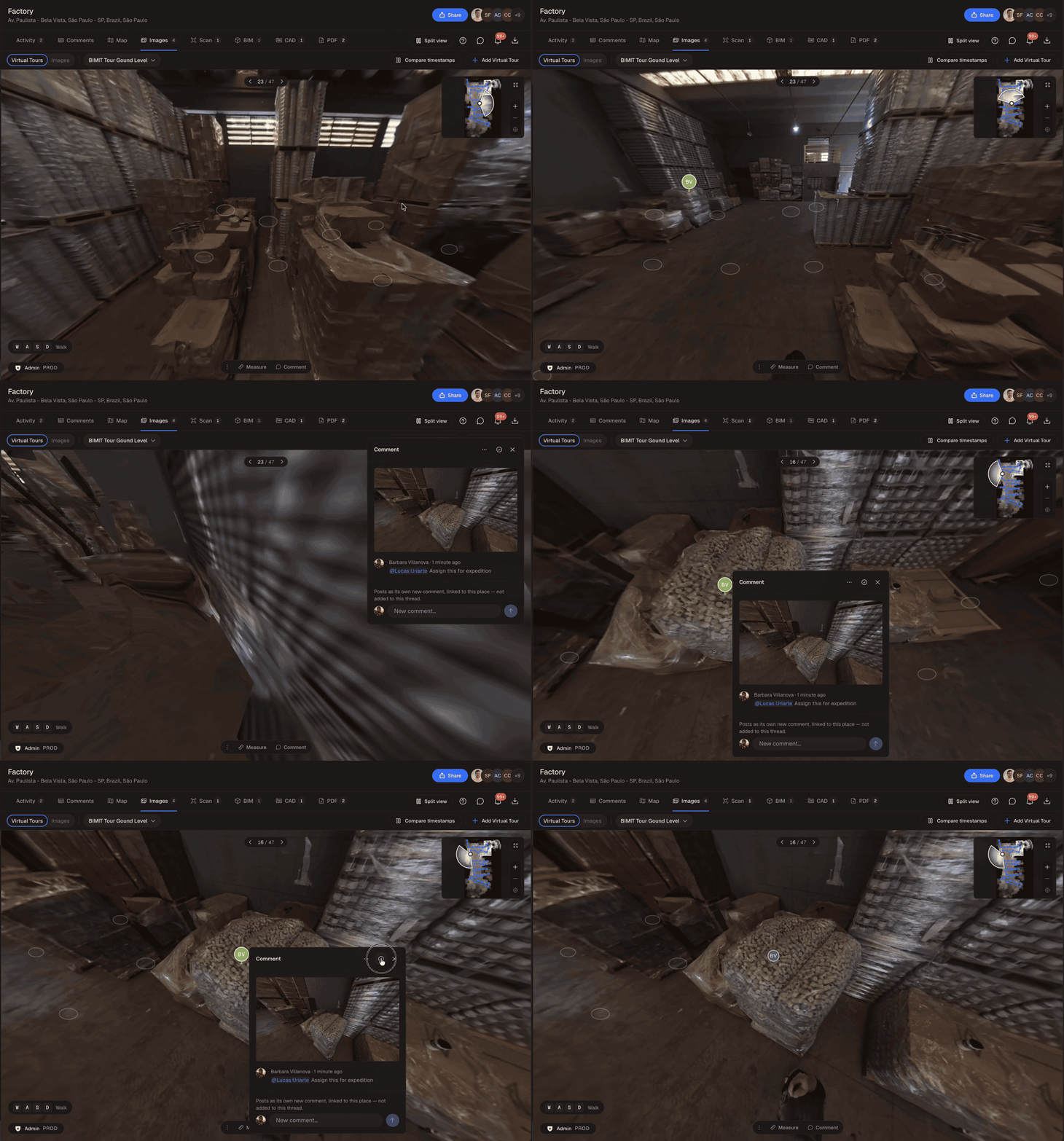
Comments in the tour are live for our enterprise accounts first, and we’re opening them up to more teams next.
When the same space gets captured again a few months later, you can open both visits side by side, and we keep both views on the same spot as you move. Because the reason anyone walks a space every quarter is to see what changed since the last time, that’s the view we spent the most time on.
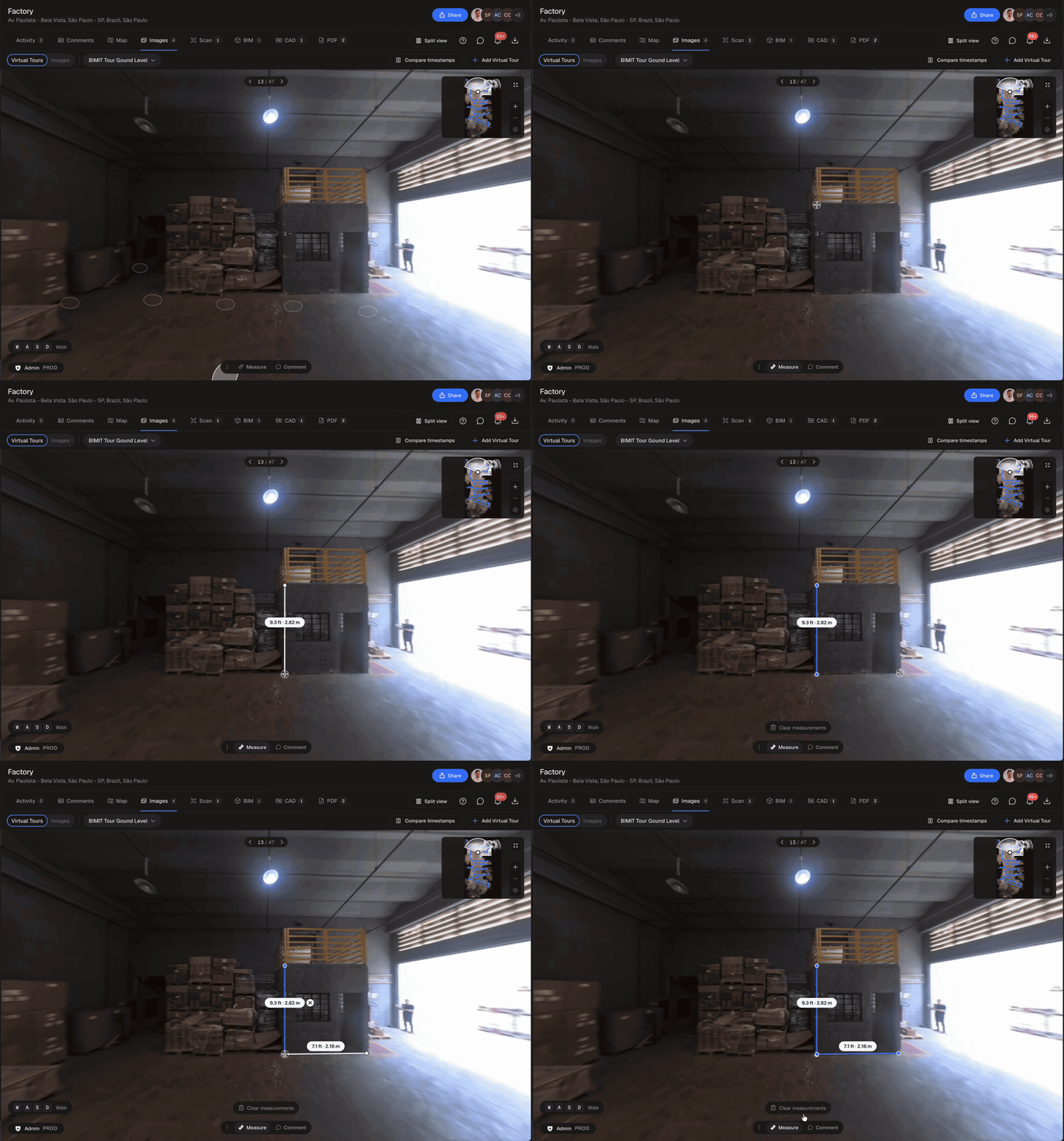
You can also click two points to get a distance in feet and meters, read from the 3D reconstruction behind the tour.
How close it gets
Measurements in a tour are approximate, meaning they’ll tell you a room is about 6 by 4 meters and where the columns are, but they won’t replace a laser scan when an inch matters. When you need dimensions you can build from, that’s what IPX Verified is for: a BIMIT 300 model from a laser scan, reviewed by an architect. A tour built from a walking video doesn’t carry that label, and we’d rather say it here than in a support ticket.
The other honest limit is image quality. The stills inside the tour come from a moving camera, and they’re sharp enough for coordination, planning and facilities work, but they’re not the tripod photos you’d put in a brochure yet. Barbara is working on swapping in the full resolution frames, and we’re also looking at letting you pin a high resolution phone photo to a spot, like the labels on an electrical panel, which is the kind of detail people end up walking back for.
What makes a capture work
The tour is only as good as the walk, and a good walk comes down to a loop: start at the door, cover every part of the space at a slow and even pace, and finish where you started, because that’s when the map recognizes the place and corrects the small errors it picked up on the way.
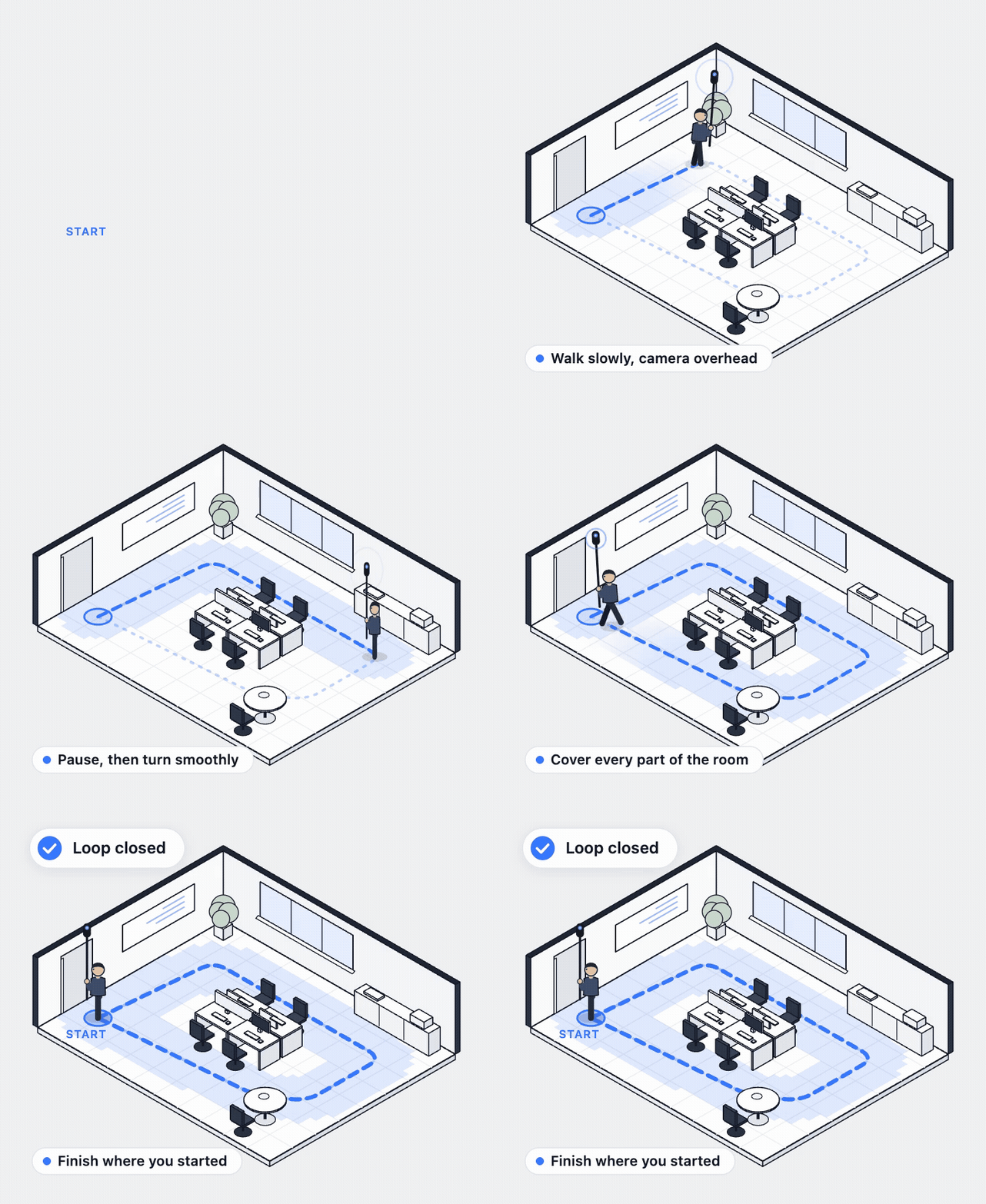
A few more things make the difference between a tour that holds together and one that doesn’t:
Clean lenses, a full battery and the highest resolution your camera offers.
Every light on before you start, even in daylight.
Walk slower than feels natural and stay within about 3 meters of every wall, and when you reach a corner or the middle of a room, pause for a second, because those are the frames the tour leans on.
One level per capture, with the pole right above your head and level the whole way.
Glass and mirrors passed at an angle, never head on.

The full checklist is in the help center under 360 Video Capture Best Practices. Animations by Rich Skinner.
What’s next
We’re rolling BIMIT Tour out with a few enterprise teams first, and what they ask for is what we build next: walking between levels without leaving the tour, a plan view you can navigate from, the BIM model and CAD drawings shown right on top of the tour (they come from the same capture, which means they line up), sharper stills, and faces blurred automatically before anyone sees them.
Questions people ask us
What is BIMIT Tour? A walkable 360 virtual tour of a space inside IPX, built from a 360 video or a laser scan with 360 panoramas, and kept on the location next to the scans, models and drawings of the same place.
Is BIMIT Tour a separate product? No. It’s an add-on to BIMIT 100, 200 and 300 that you turn on when the capture supports it.
Can I turn an Insta360 or Ricoh Theta video into a virtual tour? Yes. Any camera that exports equirectangular 360 video works, and IPX accepts mp4, mov and insv files up to 30 minutes and 25 GB.
Can I make a tour from a laser scan? Yes, when the point cloud includes 360 panoramas. We’re checking those one scan at a time for now, and we’ll tell you before you order.
Can I measure in a tour? Yes, and the distance reads in feet and meters. Treat it as approximate, and when you need verified dimensions, order an IPX Verified BIMIT 300 model from a laser scan.
Can I share a spot with a colleague? Yes. Pin a comment to the spot and tag them, and they open the tour exactly there. Comments in the tour are live for enterprise accounts first.
Can I compare two visits to the same space? Yes. When a location has two tours of the same area, open them side by side and both views stay on the same spot as you move.
Try it on a space you can walk today
Film a walk of your office with any 360 camera and upload it, and if it works, you’ve got a tour you can send to someone who has never been there. We’re a click away, both of us.
