


Summary
Three things changed in how we talk about what goes into a model.
The catalog is public. Every element we model by default, with its variants, level of detail and Revit category, lives in the help center. No account needed, and every family can be downloaded as an .rfa file.
Enterprise accounts get their own Company Catalog. We take your Revit template or family library, hundreds of families at a time, and file them into the same structure. Every family is tagged as IPX-built or as yours.
A person still decides. Revit categories are wrong more often than you would think, so our BIM Ops team reviews every batch before it is published to your account.
A model is a set of decisions
For context: a BIM model is only as useful as the agreement about what’s in it. Which door family. Which treadmill. Which ceiling. Whether the ATM is a piece of equipment or a piece of furniture.
For most portfolios that agreement lives in three places that never match. A PDF standard. A Revit template on someone’s laptop. The memory of whoever modeled the last project. Every new project reopens the same questions, the answers drift, and the BIM manager finds out at handover.
We were part of the problem. For years we told customers “we model to LOD 300” and left the rest to a conversation. That worked for one project. It didn’t work for a hundred.
It used to be a conversation. Now it’s a catalog.
What is in the public catalog
Open the Standards section of the help center and you’ll find about 250 building elements, grouped the way a modeler thinks about them. Architecture, Furniture and MEP are the scopes. Under each one sit groups (doors, windows, storage, seating, plumbing fixtures), then the element, then its variants.
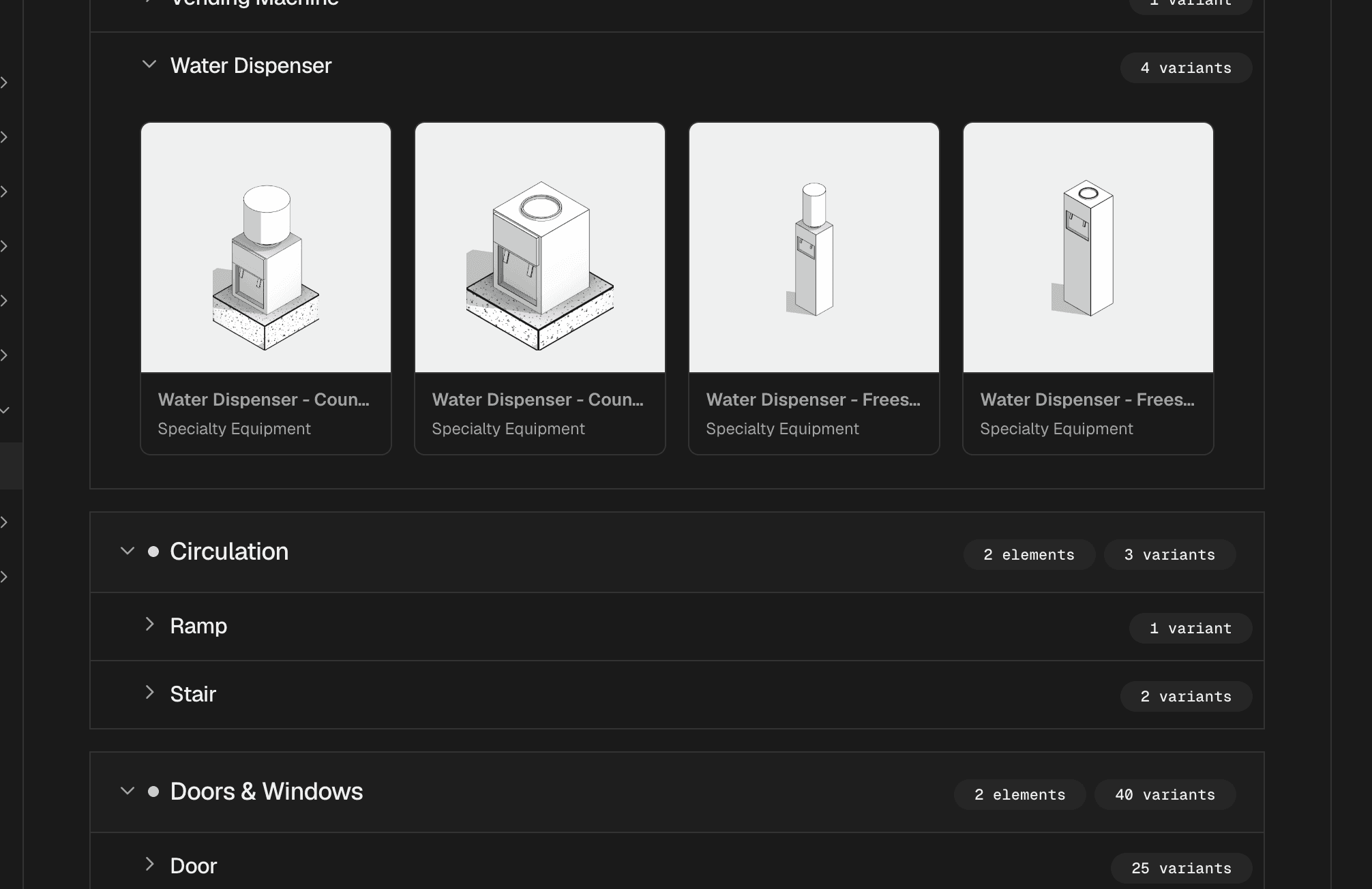
Click any element and you see what we actually place. Each variant shows its scope, group, subtype, discipline, Revit category, level of detail and placement type, plus an image so you can check it by eye. From there you can download the family in metric or imperial units and open it in Revit.
Two things make this different from a spec sheet.
First, it’s the same catalog our modelers pick from. What you see is what lands in your model, not a description of it.
Second, it’s live. When we add or retire a variant, the page changes the same day. There’s no version of the PDF to chase.

Your families become your catalog
The public catalog is the baseline. Enterprise accounts can now build on top of it with a Company Catalog. It’s live today for our first enterprise accounts, on request.
Here is how it works, in four steps.
You send us your Revit template or a folder of families. Hundreds at a time is normal.
We import them in bulk. Each family is read for what it already carries: name, Revit category, level of detail, placement type. It lands in the same scope, group, element and variant structure as the public catalog.
A person on our BIM Ops team files the batch, by hand. That’s where we decide what “ready” means for an account, when a family is a new element and when it’s a variant of an existing one. It’s also where we catch the things the file gets wrong.
We publish. Only published families show in your account, badged as IPX-built or as Customer family, with one default per element. Your team can filter by that origin and download any family.
Why step three is a person and not a script: Revit categories lie. On one fitness portfolio we pulled about 2,000 families out of the last five projects. Filtering by the families’ own data got us down to 275 pieces of gym equipment. Another 45 real gym items were filed under Furniture and Casework, and only a human review found them. Trusting the category would have published a catalog with the treadmills in the wrong room.
The compound effect
Every project adds families. Every family we file makes the next project faster and the next catalog more complete. That’s the part we find really interesting about this work. It isn’t a feature you ship once. It’s a foundation that gets stronger the more buildings run through it.
It also starts to answer questions a single project never could. A bank portfolio with 60 or more branches has ATMs, safe deposit boxes and cash counters in every one. An automotive portfolio has service bays and lifts. A fitness portfolio has lockers and stationary bikes. Once those elements are cataloged, they stop being modeled from scratch and start being placed. That’s the whole point.
Where this is not finished yet
Not perfect, meaning:
A Company Catalog is set up on request, not self-serve. Two accounts have one today.
Import is done by our team, not by you in the browser. You send the files, we run the import.
Publishing is slower than authoring. Getting a whole account’s catalog from draft to published takes conversations, not clicks, and we’re still in those with our first accounts.
The catalog inside Revit doesn’t yet pick your account’s set on its own. Preston is working on that with the plugin team, so a modeler opening one of your projects sees your families first without searching for them.
We’d rather say this here than have you find out on a project.
Questions people ask us
What’s the IPX element catalog? The public list of every building element IPX models by default, with variants, level of detail and Revit category, published in the IPX help center.
Can I download IPX Revit families? Yes. Every variant in the public catalog can be downloaded as an .rfa file in metric or imperial units, without an account.
Can IPX model with my company’s Revit families? Yes. Enterprise accounts can have a Company Catalog built from their own template or family library, set up on request. Families are imported in bulk, reviewed by our BIM Ops team, and published to the account.
How is a Company Catalog different from the On-Demand catalog? The On-Demand catalog is the shared baseline every account gets. A Company Catalog is that baseline plus your families, each tagged as IPX-built or Customer family, with defaults chosen for your projects.
Does the catalog change what my model costs? No. The catalog defines what is in the model at a given level of detail. Scope and pricing are set per project as before.
See it on your own families
Browse the public catalog at ipx.integrated-projects.com/help/standards/catalog. If you run a portfolio and want your families in it, send us a template and we’ll show you the catalog before we model a single room. We’re a click away, both of us.
